Showing posts with label Utilities. Show all posts

Sunday, October 10, 2010

ora:parseEscapedXml function fails during conversion

The ora:parseEscapedXml functions fails to convert string which have & 'Ampersand' in them. It errors during conversion and the error in the BPEL Console is nowhere close to the issue. There has already a bug filed for this issue, bug# 5598150 and it appears to have been fixed in 11.1.1.0.0. I am running on 11.1.1.2.0 and I still face this issue !

On metalink, there is a workarouund provided for this issue. One needs to replace & with & amp; amp; (mentioned with spaces so that its not converted to & by html). This can be done using a XSLT replace all template or a java embedding node.

Refer to How to solve the Ora:Parseescapedxml error when you are using ampersand character [ID 418488.1] in metalink for the workaround using java.


Bug 5598150 - AMPERSAND ENTITY IS NOT HANDLED CORRECT


Peace!


Cheers,
-AR

Thursday, September 30, 2010

Re-generation of facts fail when Java facts originating from same Schema exits

Re-generation of facts in a dictionary in Oracle Business Rules 11g is a simple step. One needs to just update the schema and reload the facts from the options available in the Fact tab of the dictionary. Unfortunately, I had been struggling for more than two weeks on this simple step and any change in schema, be it addition/deletion of an element or change in an element's type, the facts in the dictionary were so glued to the dictionary that, they refused to update !

I pondered over a lot of options and tried a lot of workarounds/suggestions:

  • Re-created the schema and imported the schema again into Jdeveloper
  • Cleaned the temporary files in windows which Jdeveloper creates, stores and uses, available under an user's profile
  • Reloaded the facts in the dictionary in a different package (not the default). This updated the facts but all the existing reference in the dictionary had errors in them
  • I even re-designed the schema based on one of my earlier posts
 All my efforts were futile and we had in the meanwhile a SR open with Oracle and we were getting some directions from them. Finally, Oracle found that we had been using a java fact created from the same schema  and imported via a jar, which was the issue!

Since the jaxb objects were the same, they was issue in refreshing the xml facts when a java fact belonging to same schema existed in the same dictionary. Below are the steps to be followed when a xml fact has to be refreshed (as in the case mentioned above):

  1. Exit Jdeveloper
  2. Remove the jar referenced to import the java fact (from hard disk)
  3. Start Jdeveloper, remove the jar from project reference
  4. Update the schema (preferably, open the schema and update contents instead of a replace of .xsd file)
  5. Save all artifacts and run a clean up (not necessary, just a feel good factor) from Build>CleanAll
  6. Reload facts from updated Schema and check for the same (in case not refreshed, close Jdeveloper and try cleaning workspace)
  7. Update the jar with the update schema and reference it in the project properties
Good to move on now !!

Peace!

Cheers,
-AR

Wednesday, September 22, 2010

Using Dynamic Endpoint for a non-AIA based Composite in SOA 11g

The use of dynamic endpoint approach for a non-AIA based Composite is more or less the same, as it would have to been done for an AIA Composite. The stress on AIA in the implementation of dynamic endpoint is because AIA has AIAConfigurations.properties file, where usually this type information is stored. This information can be changed, loaded and reference at runtime, and so making the endpoint dynamic. The non-existence of AIA does not limit one from implementing this.

One just needs to make sure, AIA is replaced by a suitable component. By this statement, I mean one needs to make sure a mechanism is available to change, load and reference the endpoint at runtime. Oracle Fusion Middleware offers a lot of option for one to replace AIA. You can do any one of the below and yet use the dynamic endpoint feature without AIA:
  • Store information in a file and use file adapter to read the file whenever required
  • Store information in a database table and use a DB adapter to fetch the information
  • Use BPEL Preference Properties to store the information (Preference Properties can be modified at runtime from EM Console)
  • Store the information in Domain Value Map (DVM) and use functions to read the information from DVM
In all the cases, the information can be modified on the fly and each have their own set of limitations. I  saw DVM as the simplest, straightforward, hassle-free and readymade approach towards dynamic endpoint.

I created a DVM to store the information: Name of the Composite and Endpoint URI for the Composite. Teh DVM can be created within the Composite or deployed to MDS directly and referred from MDS. As to, how to deploy the DVM to MDS and referring from MDS, read this post.

Implementing the Dynamic Endpoint:

Creating Variables in BPEL:

  1. Create two variables in the BPEL flow namely, TargetEndpointLocation (String) and EndpointReference (of Type EndpointReference from WS-Addressing)
  2. When creating  the variable EndpointReference, import the XSD ws_addressing.xsd and choose the element type EndpointReference to create the variable
  3. ws_addressing.xsd can be downloaded from here
  4. This way, one need not copy-paste any code, or insert any namespace in the BPEL Process and its corresponding WSDL 
  5. After creating the variables, open the .bpel in source  mode and look for the namespace http://schemas.xmlsoap.org/ws/2003/03/addressing. Change the namespace prefix to wsa so that the namespace looks like below:
     xmlns:wsa="http://schemas.xmlsoap.org/ws/2003/03/addressing"
Implementing the dynamic endpoint:

  1. Use the dvm:lookupValue function to look up the endpoint URI from the DVM. In the code snippet below, I have the DVM in MDS and I am looking up a DVM by name Endpoints to get the endpoint URI
  2. Assign the URI to /wsa:EndpointReference/wsa:Address
  3. Assign the /wsa:EndpointReference/wsa:Address to Partner link in the invoke that follows this logic
  4. Insert the below code snippet just before the invoke node from the source view of the .bpel

Code Snippet:

<scope name="Scope_GetDynamicEndpoint">
    <sequence>
        <assign name="Assign_targetEndpointLocation">
            <copy>
                <from expression="dvm:lookupValue('oramds:/apps/Samples/Endpoints.dvm','ServiceName','SampleFlow','EndPoint','')"/>
                <to variable="TargetEndpointLocation"/>
            </copy>
        </assign>
        <assign name="AssignPartnerlinkEndpointReference">
            <copy>
                <from>
                    <wsa:EndpointReference xmlns:wsa="http://schemas.xmlsoap.org/ws/2003/03/addressing">
                        <wsa:Address/>
                    </wsa:EndpointReference>
                </from>
                <to variable="EndpointReference" query="/wsa:EndpointReference"/>
            </copy>
            <copy>
                <from variable="TargetEndpointLocation"/>
                <to variable="EndpointReference"
                query="/wsa:EndpointReference/wsa:Address"/>
            </copy>
            <copy>
                <from variable="EndpointReference"/>
                <to partnerLink="SampleFlowTarget"/>
            </copy>
        </assign>
    </sequence>
</scope>

    inputVariable="Invoke_SampleFlowTarget_InputVariable"
    ......


Peace!

Cheers,
- AR

Monday, September 13, 2010

Function to find age in years in Oracle Business Rules

I was part of a discussion recently - can age be found within business rules or can bpel do the math and get it for business rules. Business rules is not less incompetent and it does offer capability to mathematical calculations or so called numerical manipulations.

I had a date captured in a tag of type String and sent to business rules. I had to find the age from the date received in input. I have written a function in business rules that can get this done. Essentially the date is converted from string to date and then a difference in dates, will get you the result as an integer.

Duration.years between(OracleDate.from string(arg_1.IP1),RL.date.get current())


Peace!

Cheers,
-AR

Sunday, September 5, 2010

Schema design - when Schema is to be used for dictionary

Quite recently, I was struggling with an issue that Tree Mode in Oracle Business Rules was not working. This was not definitely the first time I was working with Tree Mode and I had used it before successfully. In the project where I noticed the issue, the tree mode expression assigned by JDeveloper was weird. Usually its the dots and slashes that you notice in a tree mode, but here, it was dollars.

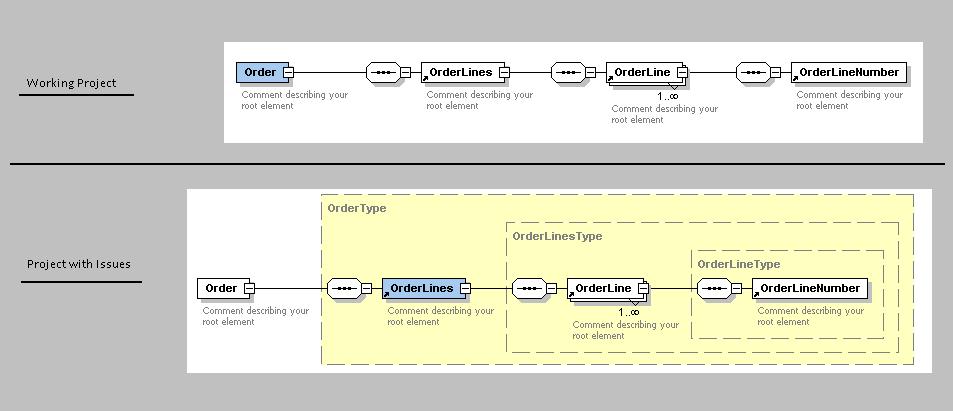
For instance, consider an order having many order lines. When you refer to orderlinenumber within the order line, the tree mode in my project with issues looked like $Order$OrderLine$OrderLineNumber. In an usual case, it would have been Order/OrderLine.OrderLineNumber.

I then compared the project which worked fine with my current project. The issue was with the facts generated and hence the XSDs created in both the projects. The first project had a complex type defined for every element and that element had in its type the complex type definition. However, in the current project, there was no complex type defined and elements were defined individually and referenced within each other. This is still valid as per W3C standards. The XSD in both cases were as below:


The change in XSD also changed the way the facts were created. The facts in the first case were created based on the elements where as in the second case, it was the Complex types that was used by the Jaxb to create the facts !

Peace !

Cheers,
-AR

Tuesday, August 24, 2010

Compare between facts in condition

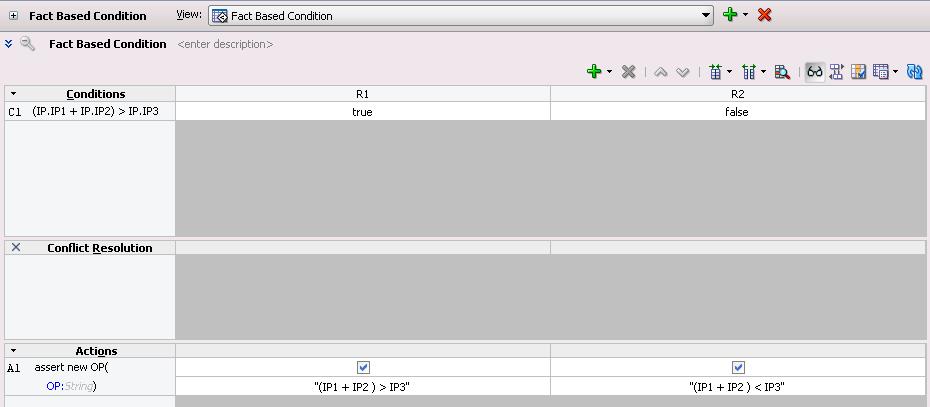
In Oracle Business Rules, it is usually the practice to validate a fact against a constant. But there might be cases where you would want to map the input from an user to one of fact, compare another fact with input from the user and make decisions. In other words, when the value of the constant to be issued in the condition is itself ambiguous, it is better to use the facts vs facts instead of facts vs constant method. For instance, I have a case where I have three inputs IP1, IP2 and IP3 coming in and I do not want to fix values (use constants for comparison in condition of rules) and instead make a condition directly involving IP1, IP2 and IP3. My schema in such a case will look like:

The decision table involving the facts will look like below:


The facts have been directly compared against each other without the need for a constant.

Peace!

Cheers,
- AR

Thursday, July 22, 2010

Remove duplicates from an input XML using XSLT

It is often the case that an input XML may contain duplicate data. It might be necessary to filter the duplicate data using a unique identifier, also from the input and send only the non-repeating, unique data to the output. In these cases, this transformation can be used to filter the data in the input.
This can be better understood by mapping this case to a real time scenario. Let us assume an organization having employees who can work in more than one department. If the input is going to contain the list of employees based on the department, there will be some employees whose data can repeat, as they are part of more than one department. If we need to filter the result based on the employee id to get a set of non-repeating unique employees, this logic can be used.

The implementation of this logic has been done using the function “following::”. The transformation logic is as below:


<?xml version="1.0" encoding="UTF-8" ?>
<?oracle-xsl-mapper
  <!-- SPECIFICATION OF MAP SOURCES AND TARGETS, DO NOT MODIFY. -->
  <mapSources>
    <source type="XSD">
      <schema location="http://localhost:7778/Schemas/Sample.xsd"/>
      <rootElement name="SampleXML" namespace="http://xmlns.oracle.com/
SampleXML"/>
    </source>
  </mapSources>
  <mapTargets>
    <target type="XSD">
      <schema location="
http://localhost:7778/Schemas/Sample.xsd"/>
      <rootElement name="
SampleXML" namespace="http://xmlns.oracle.com/SampleXML"/>
    </target>
  </mapTargets>
  <!-- GENERATED BY ORACLE XSL MAPPER 10.1.3.4.0(build 080718.0645) AT [THU SEP 24 15:16:11 EEST 2009]. -->
?>
<xsl:stylesheet version="1.0"
                xmlns:bpws="http://schemas.xmlsoap.org/ws/2003/03/business-process/"
                xmlns:xsd="http://www.w3.org/2001/XMLSchema"
                xmlns:hwf="http://xmlns.oracle.com/bpel/workflow/xpath"
                xmlns:xsl="http://www.w3.org/1999/XSL/Transform"
                exclude-result-prefixes="xsl xsd bpws hwf">
    <xsl:template match="/">
        <EmployeeListSorted>
            <xsl:for-each select="/EmployeeList/Employee[not(EmpId=following::EmpId)]">
                <xsl:sort select="./EmpId" order="ascending"/>
                <Employee>
                    <xsl:copy-of select="./Name"/>
                    <xsl:copy-of select="./EmpId"/>
                </Employee>
            </xsl:for-each>
        </EmployeeListSorted>
    </xsl:template>   
</xsl:stylesheet>


The preceding-sibling grouping technique did not work as because your nodes are not siblings of each other and because it only works where the grouping key is the string-value of the node, not where it is some other function of the node (here, its name).

Peace !

Cheers,
- AR

Monday, July 12, 2010

Deploying Oracle BRM JCA Adapter for Oracle AIA

This particular post would be useful for those working on Oracle SOA Suite 10g and having the stack Siebel, AIA and BRM. In the stack where there is Siebel, AIA and BRM, AIA invokes BRM through the JCA Adapter. This JCA Adapter is provided by the BRM Team. The JCA Adapter is responsible for converting the xml given by AIA to the input flist of BRM. The JCA Adapter also does a basic field level validation of the input xml with the opcode being called. This JCA Adapter is deployed in the middleware layer, using the Oracle SOA Suite’s EM Console.

Please do the following to deploy the JCA Adapter:

  1. Modify the application.xml: Go to $ORACLE_HOME/j2ee/$OC4J_CONTAINER/config and Modify the imported-shared-libraries to contain the oracle.bpel.common library also. Modify the imported-shared-libraries to contain the below entry:

    <import-shared-library name="oracle.bpel.common" />

    The imported-shared-libraries after the change will look as below:

    <imported-shared-libraries>
    <import-shared-library name="adf.oracle.domain" />
    <import-shared-library name="oracle.bpel.common" />
    </imported-shared-libraries>


  2. Deploy the JCA Adapter: Get the latest JCA Adapter from BRM, go to EM Console and navigate to oc4j_soa. Go to Applications tab, select Standalone Resource Adapters from the View drop down option and Choose Deploy, to deploy the BRM JCA Adapter. While deploying if the JCA Adapter is placed on the server directly, choose the option of location as Location on Server or if the JCA Adapter is present in the workstation, choose the option of browsing the file from the workstation. Choose Automatically create a new deployment plan option (Step 1/3), choose next, give a name for the Resource Adapter (Step 2/3) and make no changes in the Deployment Settings tab (Step 3/3). Click Return on successful deployment of the adapter.
  3. Create Connection Factory: Click on the JCA Adapter that was just deployed from Standalone Resource Adapters. Click on Connection Factories tab (need to create a Shared Connection Pool before we define the Connection Factory). So, click on Create option under Shared Connection Pools to create one. Create a connection factory using the shared connection pool that has been created. In JNDI Location, issue eis/BRM, choose Use Shared Connection Pool under Connection Pooling and change the Connection String to ip $BRMIPAddress $BRMPort, Username and Password of the BRM user that SOA Suite will use.
  4. Restart JCA Adapter: Stop the JCA Adapter by navigating to Standalone Resource Adapters and choosing the adapter.  Once stopped, start the JCA adapter from the same location.

Peace !

Cheers,
- AR
Creative Commons License
This work is licensed under a Creative Commons Attribution-Noncommercial-No Derivative Works 3.0 Unported License